
AI Briefing / Business AI / Local AI
An AI usage policy your team can actually follow
By Mimir IT Consultation Services · Sources checked 26 October 2026
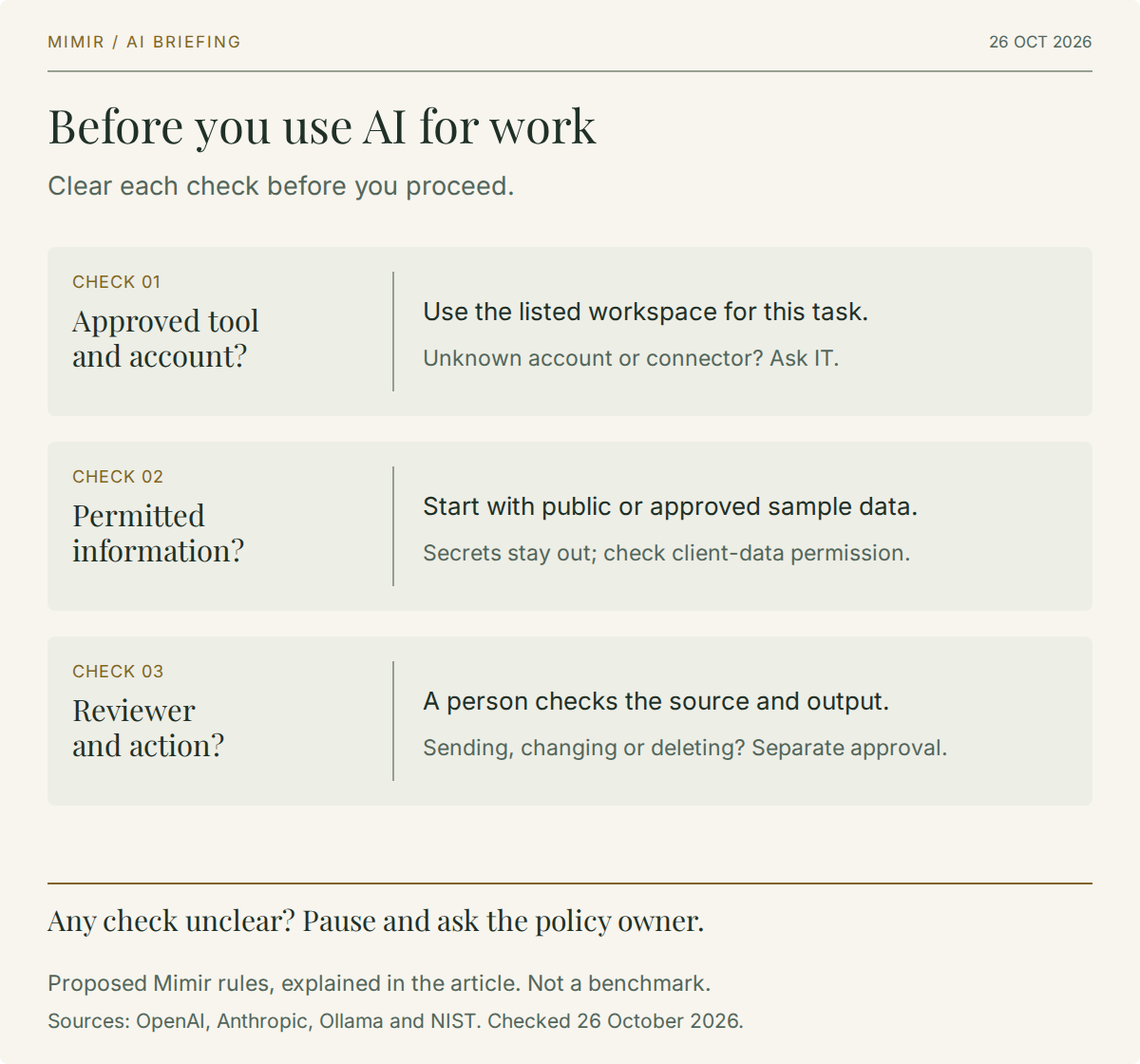
A useful AI usage policy should answer a question at the moment someone is about to work: may I use this tool, with this information, for this task? Our recommendation is to put that answer on one page, backed by an approved-tool register and a named person who can resolve exceptions.
Start with a bounded permission: staff may use an approved workspace for listed tasks and permitted data, while a person remains responsible for checking the result. Adding a new connector, uploading a different class of information or allowing the assistant to act should trigger a separate decision.
This is Mimir's proposed operating approach for routine business work. It needs adapting to your contracts, data requirements and the consequences of an error. It is not a ready-made approval for regulated decisions or unattended production changes.
Approve the account and use case
Write the product, account type, organisation workspace, permitted features and owner into the register. "We allow ChatGPT" leaves too much unanswered. A personal subscription, a company workspace and an API integration need their own assessment.
The distinction has a practical basis. OpenAI says it does not use inputs and outputs from its listed business products, including ChatGPT Business, Enterprise and the API, for model training by default. That is a product-specific commitment; the same page describes retention controls separately, with eligibility conditions. OpenAI's business data commitments.
Anthropic likewise says commercial inputs and outputs are excluded from training by default. Its commercial guidance also explains that feedback or an explicit choice to share data can permit training; a feedback report can include the related conversation. Anthropic's commercial data guidance.
Our advice: record the actual terms and settings you reviewed, including feedback, retention and connected services. A training exclusion does not, by itself, settle retention, access or where processing occurs. Do not let staff infer approval from the presence of a paid licence.
Give people recognisable data examples
A policy becomes easier to use when it names the information people handle. Set out what each approved use case permits, what requires an additional check and what must stay out of prompts and attachments.
For a cautious starting configuration, we suggest:
- Routine use: draft from published website text or an approved fictional example, using the listed workspace.
- Check first: client correspondence, internal financial detail, employee information, contracts or an attachment whose contents are unclear.
- Keep out: passwords, recovery codes, private keys and live authentication tokens. Use invented placeholders when asking for help.
Those are proposed starting rules, not universal classifications. Some organisations may approve particular confidential data in a reviewed environment; that permission should identify the environment, purpose and controls. Removing a person's name alone should not be your test for whether a document is safe to share.
Consider a hypothetical support reply. An employee can ask for a clearer explanation using a fictional fault description. Pasting the customer's full ticket history adds a different data decision. Connecting the entire helpdesk adds an access decision as well. Make those distinctions explicit before encouraging staff to experiment.
Include local AI in the same policy
A local model deserves a specific entry in the register. Include the runtime, model, device, front end, enabled tools and administrator. The question is where the complete workflow sends and stores information.
Ollama's FAQ says it does not see prompts or data when models run locally. It also distinguishes cloud-hosted models, which process prompts and responses to provide the service. Ollama documents a local-only setting that disables its cloud models and web search. Ollama's local and cloud FAQ.
Our recommendation is to check the whole application around that runtime. A separate search tool, document connector or front end needs its own review. Confirm the selected model and cloud settings rather than treating an installed desktop application as proof that every step stays on the device.
Local processing also leaves operational work: decide who can use the machine, access saved conversations, install models and maintain the software. Do not add local AI to the approved list until someone owns those decisions.
Separate drafting from doing
State what a staff member must check before using an answer: the supporting source, relevant dates, calculations, recipient and business context. The person who sends or adopts the result owns that review. For Microsoft 365 use cases, connect the policy to the permissions discussed in our Copilot deployment guide.
For an assistant that can act, write a separate permission for the action. Preparing an email is different from sending it. Suggesting a command is different from executing it. Summarising a record is different from editing or deleting it. Our business AI agents guide provides wider workflow context.
A sensible starting rule is to require a human confirmation before external messages or business-system changes. Any later exception should name the workflow, allowed actions, approver, monitoring and recovery method. A general instruction to "use AI responsibly" cannot supply those details.
Make the policy usable and owned
Publish the approved-tool register beside the short staff rule. Give it an owner, a version date and a route for requesting a new use case. Review it when a provider changes terms, a connector is added or a workflow gains new authority.
NIST's AI Risk Management Framework Playbook offers voluntary, adaptable guidance across governing, mapping, measuring and managing AI risk. It is a useful reference for the wider process; it is not a certificate that your particular deployment is safe. NIST AI RMF Playbook.
Before rollout, test the policy with representative examples: a public article, an internal spreadsheet and a proposed customer email. Ask staff to identify the approved account, permitted data and required reviewer. If reasonable people reach different answers, clarify the rule.
Also explain how to report an accidental upload or unintended action. Our recommendation is to stop the affected workflow, contact the designated support or security owner promptly, and record the tool, account, time and information involved through the approved incident channel. Avoid spreading sensitive content further while reporting it.
Mimir can help connect these rules to your cybersecurity and risk controls. The useful deliverable is a short policy supported by configured access, named owners and a review process that people can actually use.