
AI Briefing / Google / Gemini
Gemini API CLI brings cloud AI into your scripts
By Mimir IT Consultation Services · Sources checked 28 October 2026
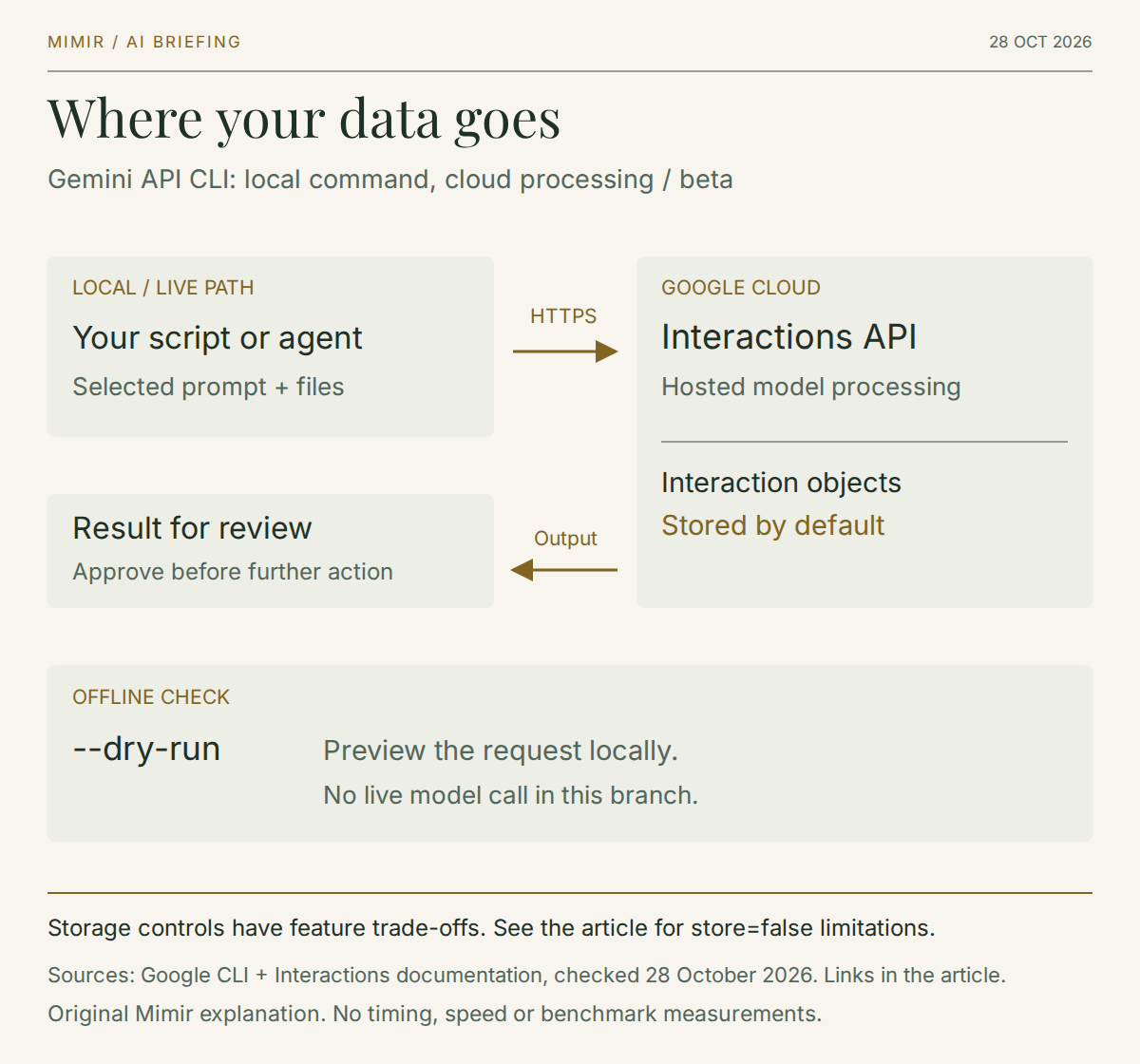
Google released the Gemini API CLI beta on 27 October 2026. It gives scripts, build jobs and coding agents a command-line route to the Gemini Interactions API. For an IT team, the useful question is whether a small AI step belongs in an existing process, and what information that step will send outside the organisation. Google's release notes confirm the release.
Mimir's recommendation is to try one bounded task with synthetic or approved public data first. Decide who reviews the result, how failure is handled and what spending is acceptable before connecting it to operational information. This briefing reviews the documentation; we have not run a performance or reliability test.
What the command-line tool adds
The executable is called gemini-api. It is separate from @google/gemini-cli, Google's interactive coding agent. The new client can sit inside a shell-based process and call models or managed agents without adding an SDK to that project.
Its documented features include machine-readable output, structured errors and an offline --dry-run that validates input and previews the HTTP request. Some media commands save files locally and return their paths. These behaviours are described in the Gemini API CLI guide.
That gives teams a possible place to insert a document-analysis step into work they already automate. It does not establish whether the answer is correct or whether the overall process saves time. Define the expected result before choosing the tool.
The command is local; the model call crosses a boundary
Running an executable on your computer does not make its model processing local. This client calls Google's hosted API. Treat the selected prompt and any submitted file content as information leaving the environment where the command runs.
There is also an important distinction between client state and server storage. The Interactions API documentation says Interaction objects are stored by default. Setting store=false in the API request opts out of that storage, but it is incompatible with background execution and prevents later turns from using previous_interaction_id. This is an API setting, not a CLI flag invented for this article.
For a pilot, inspect the actual request and record the storage decision. Do not interpret a stateless client as a promise that the provider keeps no data. An AI usage policy staff can follow should explain which information may be submitted and who can approve exceptions.
South Africa appears in Google's supported-region list. That establishes service availability; it does not, by itself, establish where a particular request is processed.
Give the pilot a useful, narrow job
Consider a hypothetical handover workflow: a technician provides synthetic support notes, and the AI produces a draft summary with outstanding actions and unresolved questions. The technician compares that draft with the input before anyone uses it. No ticket changes, messages or account actions happen automatically.
Choose several examples that expose different failure modes: a clear action, an ambiguous date, contradictory notes and a case where there is no next step. Write down what a satisfactory result must preserve. Missing an unresolved issue should count against the result even if the prose reads well.
Keep the comparison practical. Record corrections, review effort and whether the output meets the required structure. If staff spend longer repairing the summary than writing it, the experiment has answered the business question. There is no need to turn an unsuccessful pilot into a permanent integration.
These are proposed evaluation steps, not results from a Mimir deployment.
Make failure visible before removing supervision
Google labels the client beta and warns that minor versions can introduce breaking changes. Its guide recommends pinning a specific release for automated environments.
Mimir would also require the following before a scheduled job handles approved business data:
- An accountable owner. Someone can disable the step, investigate failures and decide when a version upgrade is ready.
- A clear input boundary. Select the intended files explicitly. Keep credentials in the job's secret store and inspect what the runner writes to logs.
- A bounded failure path. Stop after an agreed limit, preserve the error and hand the task back to a person. Avoid a loop that keeps submitting the same failing request.
- Output validation. Check required fields and reject incomplete output before another system consumes it. A successful command alone is not evidence of a correct business answer.
Our automation and systems hardening work starts with those operational responsibilities. Adding AI should not leave an otherwise well-understood process without an owner or recovery path.
Budget for API use and choose the right fit
Google's billing guidance says the free tier covers certain models within limits; paid access requires a billing arrangement. Installing a command-line client does not make every underlying model or managed-agent call free.
For this pilot, select the model and account tier first. Record a spending limit, expected volume and the observed charge for the trial. Include repeated requests and failed experiments when assessing the cost of completing the task. No fixed per-job price can be inferred from the CLI release alone.
The tool deserves a look when a team already has a controlled script and wants to evaluate a small cloud AI step. If the requirement is fully offline inference, it is the wrong fit. If the process cannot tolerate beta interface changes, keep it outside that process until you have a tested version and a recovery plan.
Start with the boundary and the decision, then judge whether the new command helps.